 Fredrin
SaaS
Flighty
A departure board meets a control tower: a crisp white airport panel with a phone orbited by live notification cards, then a midnight-violet control room.
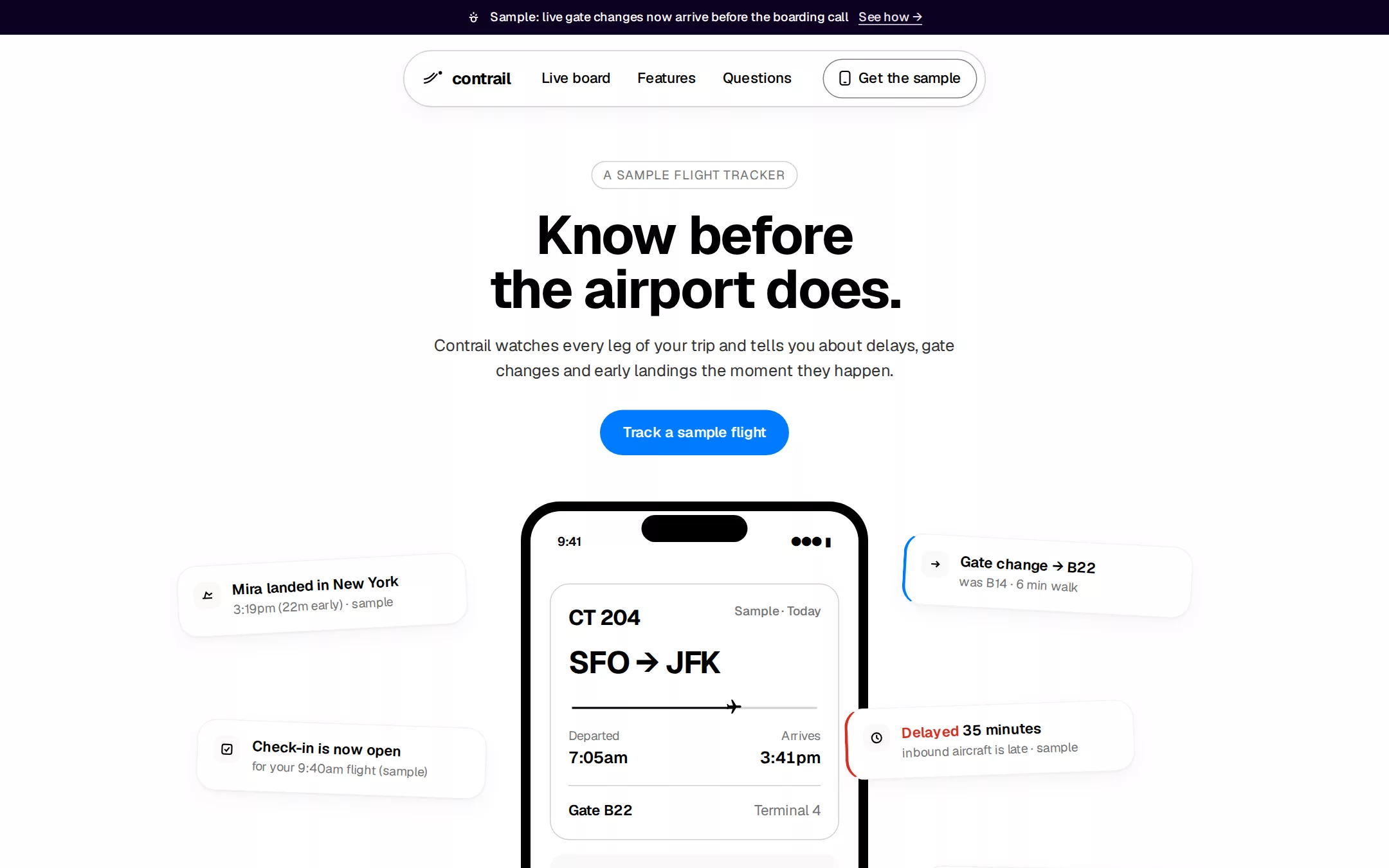
An original Contrail flight-tracker page: a Deep Indigo announcement bar, a floating white navigation pill, a centred white hero whose HTML phone shows a sample flight while five tilted notification cards orbit it, a seamless drop into a midnight-violet Live board with local day tabs and a sample departure board, a four-card feature grid, native questions and a Linen footer.
- Best for
- Consumer iPhone apps, trackers and live-status products, travel tools and any app whose best pitch is a notification arriving at the right moment.
- Tech stack
- - Next.js (App Router) - React - TypeScript - CSS custom properties - Native HTML disclosures Use Next.js App Router, React and TypeScript with plain CSS custom properties and original inline SVG for the wordmark glyph, notification glyphs, plane marker and feature glyphs. Preserve equivalent tools already installed in the host project. Render the page as a server component; the only client component is the Live board's day tabs, which keep local React state and send nothing. Draw the phone and every card in HTML and CSS — no device photograph, no screenshot image. Native details and anchors need no JavaScript. Use local font stacks only — no remote font, image, logo, map tile, flight-data API or analytics host. Provide page metadata. Build and run the production page before capturing its preview.
- Tags
- app · travel · mobile · light · dark · product
The creation prompt
1770 words, self-contained. Paste it into a chat session with your coding agent and it builds Flighty end to end.
Build the "Flighty" kickstart — A departure board meets a control tower: a crisp white airport panel with a phone orbited by live notification cards, then a midnight-violet control room.

## Design
Build a rebrandable consumer-app landing page for a flight tracker.

Create a complete landing page for Contrail, a fictional iPhone app that follows your flights — and the flights of people you are picking up — and tells you about a gate change, a delay or an early landing before the airport screens do. Its core idea: a departure board meets a control tower — the top of the page reads as a crisp white airport information panel, then the page drops into a deep midnight-violet control room where screens glow in the dark. This is a concept presentation, not a real product — no App Store badge, download link, pricing, accounts, awards, press logos, airline logos, real flight numbers, real people or real reviews. Use original branding, UI and copy throughout.

Color: the page is overwhelmingly achromatic. Pure White #FFFFFF is the light canvas and the notification-card surface. Linen #FAF8F7 is the warm alternate card surface. Pure Black #000000 is headlines, icon strokes and primary text; Carbon #333333 is paragraph copy; Steel #737373 is card metadata and inactive tabs; Silver #CFCFCF is hairline borders on light. Deep Indigo #0D0021 is the dark section canvas and the announcement bar; Midnight Ink #05010D is the dark card surface, bordered with 1px rgba(255,255,255,0.08). Two signal colours and one alert, never washes: Signal Blue #007BFF fills exactly one primary button per surface with #FFFFFF text and is the focus ring; Amber Alert #F7BE00 fills only the Get the sample button in the dark section, with #000000 text; Alert Red #D92D20 marks only a delay or cancellation — a 3px left border on one card and one status word. The light-to-dark shift is a seamless change of background, never a divider line.

Typography: one sans-serif for everything — system-ui, Inter, -apple-system, "Segoe UI", sans-serif — weights 400, 500, 600 and 700. Display 56px/1.00 weight 700 at -1.4px tracking, the voice of a gate-change announcement; section heading 32px/1.1 weight 700 at -0.8px; card headline 15px weight 600; body 17px/1.5 weight 400 at -0.17px; nav 15px weight 500; metadata 13px weight 400. One editorial accent: a 24px EB Garamond ("EB Garamond", Garamond, Georgia, serif) 700 italic line at line-height 0.9, used once, above the dark section headline. Flight codes, times and gates set in the same sans with tabular numerals. Locally installed fonts only, no remote font request. Shapes: 999px radius on every button, tab, tag and the navigation; 20px on notification cards; 16px on dark board cards; 40px on the phone frame. Spacing: 8px base, 16px card padding, 64–80px between sections, content in a centred 1200px column. Elevation: whisper-thin — notification cards and the navigation carry 0 1px 2px rgba(0,0,0,0.04), 0 8px 24px rgba(0,0,0,0.04); nothing is heavier.

Announcement bar: a full-width 36px strip in Deep Indigo #0D0021 with centred 13px weight-500 #FFFFFF text — a small line glyph, Sample: live gate changes now arrive before the boarding call, and a See how → link that jumps to the Live board section.

Navigation pill: floating 16px below the bar, centred, a #FFFFFF 999px pill with a 1px #CFCFCF border and the whisper shadow, 8px 16px padding. Left: an original contrail glyph (two parallel 1.5px black strokes curving into a dot) and the wordmark contrail in 17px weight 700. Centre: 15px weight-500 black links Live board, Features, Questions, each an anchor. Right: a ghost Get the sample button — transparent fill, 1px rgba(0,0,0,0.5) border, 999px radius, 8px 16px padding, a small phone glyph — that jumps to the Questions section.

Hero: full-width white, everything centred. A 13px Steel tag pill with a 1px #CFCFCF border reading A SAMPLE FLIGHT TRACKER; a 56px black headline on two lines, Know before the airport does.; a 17px Carbon subhead at max 560px, Contrail watches every leg of your trip and tells you about delays, gate changes and early landings the moment they happen.; then one Signal Blue #007BFF primary button, Track a sample flight (15px weight 600, 12px 24px padding). Below, a 360px-wide phone drawn in HTML/CSS — a #000000 40px-radius frame with a 10px bezel around a white screen showing a sample flight card: CT 204 in 22px 700, SFO → JFK in 32px 700 with tabular figures, a thin progress line with a small plane glyph two-thirds along, Departed 7:05am and Arrives 3:41pm in 13px Steel, and a Gate B22 · Terminal 4 row. Scattered around the phone at -3° to +3° rotations, five floating notification cards (#FFFFFF, 20px radius, 16px padding, whisper shadow, a 28px rounded glyph, a 15px weight-600 headline and 13px Steel metadata): Mira landed in New York · 3:19pm (22m early); Check-in is now open · for your 9:40am flight (sample); Gate change → B22 · was B14, 6 min walk, with a 3px Signal Blue left border; Delayed 35 minutes · inbound aircraft is late, with a 3px Alert Red #D92D20 left border; and Your bag is on the belt · carousel 7. Every name and code is invented and the cards say sample.

Live board (id board): the page shifts seamlessly to Deep Indigo #0D0021. A single 24px EB Garamond italic line in #CFCFCF, Meanwhile, in the control room…; a 56px #FFFFFF headline, Every leg, one board.; a 17px #CFCFCF subhead. Then a row of three 999px tabs — Today, Tomorrow, Saturday — the active one #FFFFFF with #000000 text, the others transparent with #CFCFCF text and a 1px rgba(255,255,255,0.08) border; choosing one swaps the board rows from local state. Below it a departure board: a Midnight Ink #05010D card with 16px radius and the 8% white border holding five rows on hairlines, each with flight code, route, scheduled time, gate and a status word — On time and Boarding in #FFFFFF, Landed in #CFCFCF, Delayed in Alert Red. All codes and routes are labelled sample. Close the section with one Amber Alert #F7BE00 Get the sample button (#000000 text, 999px) that jumps to Questions.

Features (id features): still on Deep Indigo, a 4-column grid of Midnight Ink cards with 16px radius, the 8% white border, 40px vertical padding and no shadow: Push before the PA (a bell glyph), Connections at a glance (two linked dots), Share a flight with one link (a chain glyph), and A passport of every trip (a stamped circle). Each has an original 32px line glyph in rgba(255,255,255,0.6), a 17px weight-600 white title and a 15px #CFCFCF line.

Questions (id questions): back on white, a 32px heading Questions and native details rows on #CFCFCF hairlines with 17px weight-600 black summaries and a thin plus that becomes a minus: Is Contrail real? — no, it is a fictional concept. Can I track my flight here? — no; every flight on this page is a sample and nothing is sent. Where is the download? — there is none; the buttons stay on this page.

Footer: on Linen #FAF8F7, 48px padding, the wordmark, a 13px Steel line Contrail is a fictional concept. Flight data shown is sample data., and 15px anchor links to Live board, Features and Questions.

At 760px and below: 16px page padding, the navigation keeps only the wordmark and Get the sample, the display drops to 40px, the notification cards tuck into a two-column stack beneath the phone without rotation, the board rows wrap gate and time under the route, the feature grid becomes two columns then one at 480px. The page fits a 360px viewport with no horizontal page overflow. Use semantic landmarks, one h1, a skip link, visible 2px Signal Blue focus outlines offset 2px on every control, text alternatives for every meaningful glyph, and keyboard-operable tabs and disclosures.

## Tech stack
- Next.js (App Router)
- React
- TypeScript
- CSS custom properties
- Native HTML disclosures

Use Next.js App Router, React and TypeScript with plain CSS custom properties and original inline SVG for the wordmark glyph, notification glyphs, plane marker and feature glyphs. Preserve equivalent tools already installed in the host project. Render the page as a server component; the only client component is the Live board's day tabs, which keep local React state and send nothing. Draw the phone and every card in HTML and CSS — no device photograph, no screenshot image. Native details and anchors need no JavaScript. Use local font stacks only — no remote font, image, logo, map tile, flight-data API or analytics host. Provide page metadata. Build and run the production page before capturing its preview.
Where the repo you are working in already has an equivalent in place, keep the repo's choice and say which one you kept.

## Everything else
Keep Contrail clearly fictional and rebrandable: no Flighty wordmark, App Store badge, award badges, press or airline logos, real flight numbers, prices, review quotes or real people. Every flight, name and notification is labelled sample. Colour is signal, not decoration: Signal Blue #007BFF fills one primary button per surface and draws focus rings; Amber Alert #F7BE00 fills only the dark section's Get the sample button; Alert Red #D92D20 marks only a delay; everything else stays in Pure Black #000000, Carbon #333333, Steel #737373, Silver #CFCFCF, Pure White #FFFFFF, Linen #FAF8F7, Deep Indigo #0D0021 and Midnight Ink #05010D. Shadows never exceed 0.04 opacity. Every link leads to a real section on the page; nothing is sent or stored. Content is initially visible — no scroll reveals, marquees, flight animations or parallax; hover and focus are a 150ms change, disabled for prefers-reduced-motion. WCAG AA contrast on every text/background pair — white on Signal Blue at 15px 600 passes as UI text, and black on Amber Alert is always used — keyboard-operable tabs and disclosures, and a 360px layout without horizontal page overflow.

### Non-negotiables
- Responsive from 360px through desktop — no horizontal page overflow at any width. Deliberately scrollable regions stay within the viewport and remain keyboard and touch accessible.
- Every text/background pair clears WCAG AA (4.5:1 for body, 3:1 for large text); adjust a tint rather than shipping a failing pair.
- Fully keyboard operable, with a visible focus ring drawn in the accent colour.
- Honour `prefers-reduced-motion` — swap every transition for an instant state change.
- Write real copy in the voice described above; no lorem ipsum and no TODO placeholders.
- Use system or self-hosted fonts and CSS/SVG-drawn graphics — do not depend on a remote image or icon service.

Build the whole page end to end and show me the result running — not a description of it.
Pasting the prompt is step one. Fredrin runs the agent that builds it, one ticket per look.