 Fredrin
Developer
Warp
An obsidian command center where one violet phosphor marks every signal.
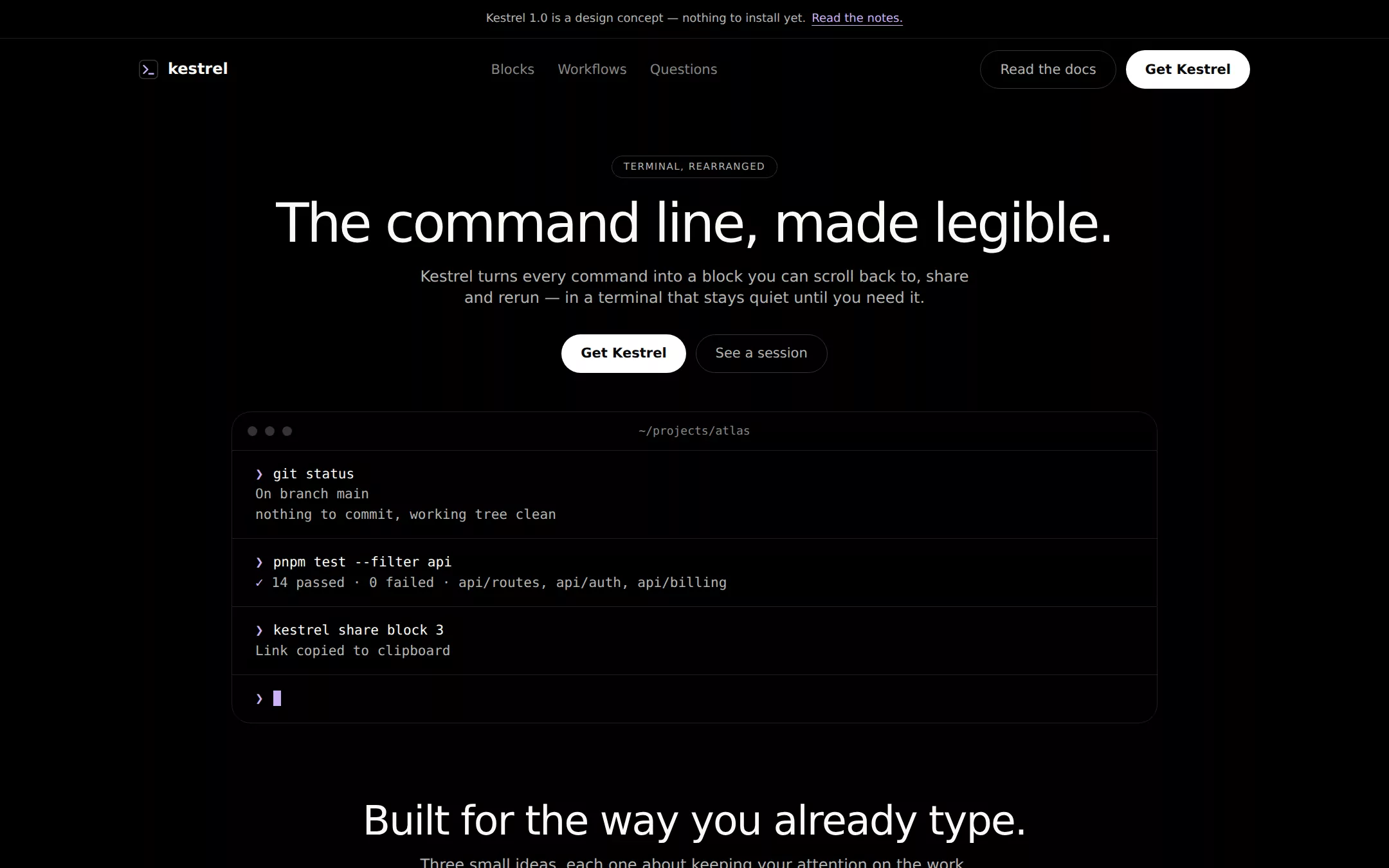
An original Kestrel terminal landing page on matte black: a compact announcement strip, a white pill download action, a faux terminal window rendered in real HTML, flat stepped-gray feature panels and native questions. Violet appears only in strokes, prompts and links.
- Best for
- Command-line tools, developer terminals, CLIs and infrastructure products.
- Tech stack
- - Next.js (App Router) - React - TypeScript - CSS custom properties - Native HTML disclosures Use Next.js App Router, React and TypeScript with plain CSS custom properties and original inline SVG. Preserve equivalent tools already installed in the host project. Implement this as a server-rendered page; the terminal preview is static HTML, and native details and anchors need no client component or dependency. Use system font stacks only — no remote font, image, icon or analytics host. Provide page metadata. Build and run the production page before capturing its preview.
- Tags
- developer · terminal · dark · minimal · product
The creation prompt
1284 words, self-contained. Paste it into a chat session with your coding agent and it builds Warp end to end.
Build the "Warp" kickstart — An obsidian command center where one violet phosphor marks every signal.

## Design
Build a rebrandable developer-terminal product landing page.

Create a complete landing page for Kestrel, a fictional terminal for people who live on the command line. Its core idea: every command becomes a readable block you can revisit, and the prompt stays out of the way. This is a concept presentation, not a real download. Use original branding and copy throughout.

Color: the canvas is #000000. Surfaces rise by flat gray steps — #121212 for the footer and alternate bands, #1E1E1D for panels and card borders, #333333 for ghost-button borders, tag outlines and hairlines, #40403F for hover. Primary text and headlines are warm bone #FAF9F6, never pure white. Body and secondary copy are #B4B4B2; captions and metadata #868684 (only at 12px+ on #000000, where it still clears 4.5:1). The single chromatic color is phosphor violet #CBB0F7: icon strokes, the terminal prompt glyph, command highlights, inline links and focus rings — never a filled button or a large wash. The only filled action is a #FFFFFF pill with #080808 text. No gradients, glows, blur or drop shadows anywhere; elevation is surface stepping plus 1px borders.

Typography: headings and body use ui-sans-serif, system-ui, -apple-system, "Segoe UI", Roboto, Helvetica, Arial, sans-serif — an open system substitute for the source's licensed geometric sans, with no remote font request. Terminal and code text use ui-monospace, SFMono-Regular, Menlo, Consolas, monospace. Weight 400 carries headlines: the h1 is 56px/0.96 with -0.04em tracking; section h2 is 42px/1 with -0.027em; panel titles 18px at 600; body 16px/1.38 and 14px/1.25; eyebrow tags 10px uppercase with 0.1em tracking. Never use 700 for body or UI labels. Use a centered 1200px column, 24px desktop gutters, 10px inline gaps and 64–80px between sections. Radii: panels 20px, filled and ghost buttons 33px, tags 50px, links and inputs 7px, icon tiles 4px.

Announcement strip: full width, 40px tall, #000000 with a 1px #1E1E1D bottom border, centered 12px #B4B4B2 text Kestrel 1.0 is a design concept — nothing to install yet. followed by an underlined violet Read the notes. link to the questions section.

Compact top navigation: 64px tall on #000000, no border or shadow. Left: an original mark — a 20px square with 4px radius drawn as a violet-stroked chevron and underscore — and the word kestrel in 16px bone at 600. Center: Blocks, Workflows and Questions links in 14px #868684 with 24px gaps, hover to bone; every link points to a real section. Right: a ghost pill Read the docs and a filled white pill Get Kestrel, both anchors to real sections.

Centered hero with terminal preview: 56px top padding. A 10px uppercase pill tag TERMINAL, REARRANGED with a 1px #333333 border. Below it the single-line desktop h1 The command line, made legible. Under it a 16px #B4B4B2 lead: Kestrel turns every command into a block you can scroll back to, share and rerun — in a terminal that stays quiet until you need it. Then a row with the white Get Kestrel pill and the ghost See a session pill. Beneath, a terminal window approximately 960px wide and 380px tall, #000000 with a 1px #1E1E1D border and 20px radius, built entirely in HTML, never an image: a 40px title bar with three 10px #333333 dots and the centered caption ~/projects/atlas in #868684; then three command blocks separated by #1E1E1D hairlines. Each block starts with a violet ❯ prompt and a bone command, then #B4B4B2 output: git status (On branch main, nothing to commit), pnpm test --filter api (a 14-passed summary where only the checkmark is violet), and kestrel share block 3 (Link copied to clipboard). The last line is an empty prompt with a blinking violet caret. Let the next section begin near the bottom of a 900px desktop viewport.

Three flat feature panels (id blocks): a centered 42px heading Built for the way you already type. and a 16px #B4B4B2 line under it. Three equal #121212 panels with 20px radius, 1px #1E1E1D border, 24px padding and no shadow. Each opens with a 20px violet-stroked original inline SVG icon (stacked blocks, a branching path, a lock), then an 18px 600 bone title and 14px body: Blocks, not scrollback. / Each command and its output stay together, so you find what ran and what it printed.; Workflows you can name. / Save a sequence of commands once and run it by name from any project.; Local by default. / Your history stays on your machine; nothing is synced unless you choose to share a block.

Native terminal questions (id questions): a 42px heading A few honest answers. and three full-width details elements divided by 1px #1E1E1D hairlines, 16px bone summaries with a violet plus glyph. Is Kestrel a real product? — no, it is a fictional design study. Can I download it? — there is no download, account or waitlist. Does it replace my shell? — the concept runs your existing shell; Kestrel only arranges its output. Answers are in server-rendered HTML with visible violet focus rings.

Quiet fictional footer: #121212 with 64px top and 40px bottom padding, four columns of 12px #868684 links (Product, Blocks, Questions, Back to top) that all resolve to real anchors, and a bottom line Kestrel is a fictional product concept. Not affiliated with any terminal vendor. No social icons, customer logos, testimonials, newsletter or pricing.

At 760px and below: 20px gutters, a 40px h1 that may wrap, 32px h2, stacked full-width pills, a one-column panel grid and a terminal whose lines wrap instead of scrolling the page. The page fits a 360px viewport with no horizontal overflow. Use semantic landmarks, one h1, a skip link, visible violet focus, WCAG AA contrast and keyboard-operable details. Everything works without JavaScript.

## Tech stack
- Next.js (App Router)
- React
- TypeScript
- CSS custom properties
- Native HTML disclosures

Use Next.js App Router, React and TypeScript with plain CSS custom properties and original inline SVG. Preserve equivalent tools already installed in the host project. Implement this as a server-rendered page; the terminal preview is static HTML, and native details and anchors need no client component or dependency. Use system font stacks only — no remote font, image, icon or analytics host. Provide page metadata. Build and run the production page before capturing its preview.
Where the repo you are working in already has an equivalent in place, keep the repo's choice and say which one you kept.

## Everything else
Keep Kestrel clearly fictional and rebrandable: no source wordmark, no real company logos, no testimonials, no user counts, no benchmark or speed claims, no pricing and no download. Every link leads to a real section on the page. The terminal transcript is illustrative HTML, not a screenshot. Deliver initially visible content, WCAG AA contrast on every text/background pair, reduced-motion support that stops the caret blink, keyboard-operable questions and a 360px layout without horizontal overflow.

### Non-negotiables
- Responsive from 360px through desktop — no horizontal page overflow at any width. Deliberately scrollable regions stay within the viewport and remain keyboard and touch accessible.
- Every text/background pair clears WCAG AA (4.5:1 for body, 3:1 for large text); adjust a tint rather than shipping a failing pair.
- Fully keyboard operable, with a visible focus ring drawn in the accent colour.
- Honour `prefers-reduced-motion` — swap every transition for an instant state change.
- Write real copy in the voice described above; no lorem ipsum and no TODO placeholders.
- Use system or self-hosted fonts and CSS/SVG-drawn graphics — do not depend on a remote image or icon service.

Build the whole page end to end and show me the result running — not a description of it.
Pasting the prompt is step one. Fredrin runs the agent that builds it, one ticket per look.