 Fredrin
SaaS
Perplexity AI
A quiet reading desk for following a thought.
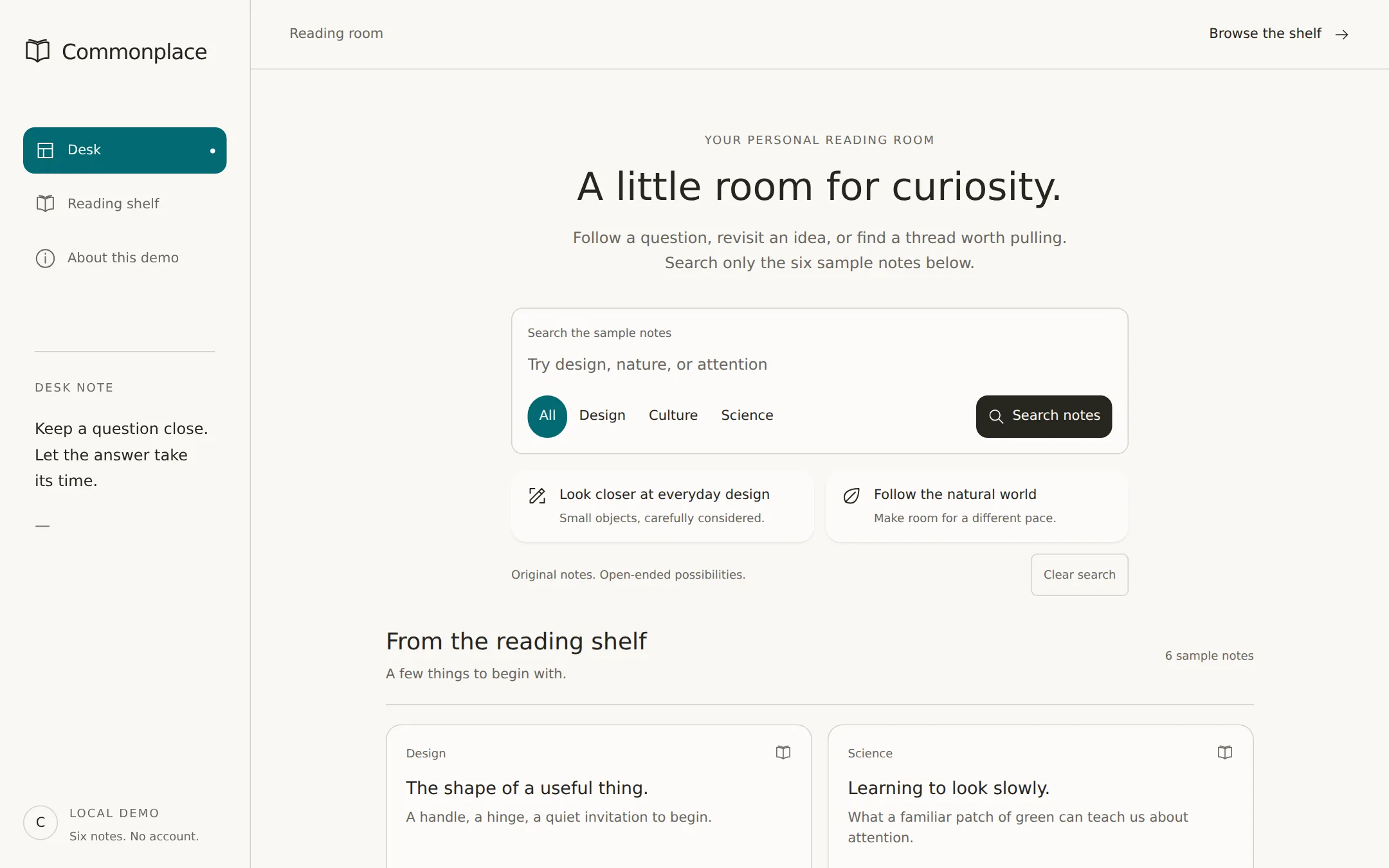
A warm, text-first workspace for the fictional reading desk Commonplace. A left navigation rail frames a centered search composer, two topic suggestions and a shelf of expandable notes. Search and subject filters work entirely in the browser, with six original sample notes and no AI service to configure.
- Best for
- Independent researchers, writers and small knowledge collections that need a calm, searchable home.
- Tech stack
- Use Next.js App Router, React and TypeScript, retaining equivalent choices already present in an existing repository. Use a Server Component for the outer page and a small Client Component for the local reading desk. Plain CSS custom properties are sufficient; use existing accessible primitives when available. Store the six notes, navigation labels and identity in one typed configuration. Render original inline SVG icons without fetching any external assets. Use local or system fonts. No database, authentication, external search, AI SDK, API key, analytics, paid service or persistence is needed. The static note collection must render on first load; with JavaScript disabled, keep every note and its native disclosure readable and explain that filtering requires JavaScript. - Next.js (App Router) - React - TypeScript - CSS custom properties - Local React state
- Tags
- research · reading · workspace · parchment · teal · light
The creation prompt
1769 words, self-contained. Paste it into a chat session with your coding agent and it builds Perplexity AI end to end.
Build the "Perplexity AI" kickstart — A quiet reading desk for following a thought.

## Design
Create Commonplace as an original reading workspace. Source-derived foundation: parchment #FAF8F5, paper #FDFBFA, warm ink #27251E, hairlines #D1D1CD and a single teal #016A71. Use teal for selected fills with white #FFFFFF labels. Set a 260px left rail beside a centered main column no wider than 900px. The search composer is 640px wide. Cards have 16px corners; inputs and filled actions 12px; ghost actions 6px; filter chips are pills. Keep borders 1px and card shadow to 0 1px 2px rgb(0 0 0 / 8%). Use a 4px spacing rhythm, 16px card padding and 32px section gaps. Use local Inter or system sans at weights 400–500. Avoid photographs, illustrations, extra accent colors and heavy elevation.

Original composition: at 1440px, the rail spans the viewport height with 24px padding and a right hairline. Place the open-book Commonplace mark at its top, three spacious navigation rows below, a small DESK NOTE section midway down and a LOCAL DEMO disclosure at the bottom. The main pane has a 72px top bar, then a centered introduction starting about 140px from the viewport top. Use a 40px/1.2 headline, 16px/1.5 supporting copy and a 12px uppercase eyebrow with 0.12em tracking. Keep the headline on one line where it fits; use 30px on mobile. Section titles are 24px/1.3, card titles 18px/1.35, control and excerpt text 14px/1.5. Use 12px only for short metadata. These larger headings are an adaptation for this original sample.

The composer contains a visible Search the sample notes label, a full-width search field, and a bottom row of four subject chips at left with an ink-filled Search notes button at right. Give it 16px padding and a restrained hairline frame; use a 2px teal outline with 3px offset when controls receive keyboard focus. All labels and secondary reading text use #686660, darkened for contrast. Do not use the lighter source helper-text color for essential text. Keep the primary button ink with parchment text; selected subject buttons use teal with white text. Do not add a decorative glow or gradient.

Place two suggestion buttons directly below the composer, each occupying half its width. Each contains a small original line icon, a title and muted supporting sentence, all left-aligned. Start the reading shelf around 590px from the top of the desktop viewport. Its heading and result count share a row above a hairline. Note cards form two columns with 16px gaps, paper fill, restrained edges and generous breathing room. Each card shows a subject label, title, excerpt and Read note disclosure affordance; expanded writing stays in that card. Do not truncate excerpts or conceal the remainder of the page for the screenshot.

At 900px and below move the rail into a compact top header with wrapping links, remove fixed positioning and let the main pane fill the width. At 600px stack suggestions and shelf cards, wrap composer controls and use 20px gutters. Support 320px and 200% zoom without page-level horizontal overflow. Use only subtle 150ms control transitions and disable them for reduced motion. Keep initial content visible without JavaScript.

Typography stack: Inter, system-ui, -apple-system, 'Segoe UI', sans-serif.

Page structure:
1. Left rail: Commonplace wordmark with an original open-book mark; Desk, Reading shelf and About this demo links; a short desk note and a local-demo footer.
2. Top bar: Reading room at left and a Browse the shelf anchor at right.
3. Desk: YOUR PERSONAL READING ROOM eyebrow, A little room for curiosity. headline, a short introduction, search composer and All / Design / Culture / Science subject buttons.
4. Suggestions: two side-by-side topic buttons with original outline icons, short titles and a sentence each.
5. Reading shelf: From the reading shelf heading, live result count and six expandable sample notes in a two-column grid.
6. About and footer: explain local keyword search, original sample content and how the workspace can be adapted.

## Tech stack
Use Next.js App Router, React and TypeScript, retaining equivalent choices already present in an existing repository. Use a Server Component for the outer page and a small Client Component for the local reading desk. Plain CSS custom properties are sufficient; use existing accessible primitives when available. Store the six notes, navigation labels and identity in one typed configuration. Render original inline SVG icons without fetching any external assets. Use local or system fonts. No database, authentication, external search, AI SDK, API key, analytics, paid service or persistence is needed. The static note collection must render on first load; with JavaScript disabled, keep every note and its native disclosure readable and explain that filtering requires JavaScript.

- Next.js (App Router)
- React
- TypeScript
- CSS custom properties
- Local React state
Where the repo you are working in already has an equivalent in place, keep the repo's choice and say which one you kept.

## Everything else
Build a searchable reading workspace with local sample notes on Next.js (App Router).

Build a complete reading workspace for Commonplace, an original fictional product. It is a local keyword-search demo, not an AI answer engine. Brand mark: two offset open-book outlines, designed from scratch. Left navigation: Desk targets #desk, Reading shelf targets #library, About this demo targets #about. The wordmark targets #desk. The Desk link may retain a selected appearance as the workspace entry; do not imply it tracks scrolling. The rail's DESK NOTE says Keep a question close. Let the answer take its time. The footer says Local demo / Six notes. No account. The top bar says Reading room and links Browse the shelf to #library.

The desk eyebrow is YOUR PERSONAL READING ROOM. Main headline: A little room for curiosity. Supporting copy: Follow a question, revisit an idea, or find a thread worth pulling. Search only the six sample notes below. The visible field label is Search the sample notes; placeholder: Try design, nature, or attention. The button says Search notes. The subject choices are All, Design, Culture and Science, with All selected initially. Clear search is a separate ghost action below the suggestions.

Submitting the form trims the query, splits it on whitespace, and matches every term case-insensitively against each note's title, excerpt, body and keywords. Combine it with the chosen subject. Selecting a subject immediately applies that subject with the last submitted query. Maintain the entered text while browsing subjects. An empty query matches every note in the subject. Search and filtering update the shelf's visible count in a polite live region without moving keyboard focus. Clear search resets both query and subject to the initial six-note view. Nothing persists or leaves the browser. An unmatched query shows No notes found. Try another word or clear your search., with the same reset action available.

Suggestion one: Look closer at everyday design. Description: Small objects, carefully considered. Activating it fills and submits design and selects All. Suggestion two: Follow the natural world. Description: Make room for a different pace. Activating it fills and submits nature and selects All. These are native buttons, not links to an external model.

Shelf heading: From the reading shelf. Subtitle: A few things to begin with. Initial result count: 6 sample notes. Use these six original notes in this order, with the complete body in native details/summary and Read note as the affordance. Note 1, Design, The shape of a useful thing. Excerpt: A handle, a hinge, a quiet invitation to begin. Body: A well-placed handle tells a small story about how an object wants to be held. Useful design begins with noticing that ordinary exchange. Keywords: design objects everyday. Note 2, Science, Learning to look slowly. Excerpt: What a familiar patch of green can teach us about attention. Body: Return to the same tree and a new detail may come forward: a changed shadow, a folded leaf, an unexpected visitor. This sample reflection is an invitation to observe nature, not a scientific claim. Keywords: nature attention observation. Note 3, Culture, The margin is part of the page. Excerpt: Leave a little space for the next thought. Body: An empty margin gives a reader somewhere to pause. In this imagined reading practice, the unfinished edge is as welcome as the sentence. Keywords: reading writing attention. Note 4, Design, A map for wandering. Excerpt: A good path can leave room for a detour. Body: This fictional map begins with landmarks rather than destinations. Its design invites a reader to choose a route and change their mind. Keywords: design maps exploration. Note 5, Science, Patterns after rain. Excerpt: Notice the lines water leaves behind. Body: Rain gathers in small channels across a path. Sketching those temporary lines can be a quiet way to pay attention to nature without pretending to explain it all. Keywords: nature water patterns. Note 6, Culture, Collecting small beginnings. Excerpt: A sentence, a question, a place to return. Body: A notebook need not begin with a plan. A few words from an ordinary day can become a place to return when a new idea needs a start. Keywords: writing ideas notebook.

The About section heading is A desk, not an answer machine. Explain that search only filters the six original sample notes, no AI or live sources are consulted, and reload resets the controls. All notes are fictional editorial samples, not quotations, citations or verified research. Footer: Commonplace — A place to follow a thought. Fictional sample. No affiliation or endorsement. Include a Back to desk anchor.

Provide semantic header, nav, main and footer landmarks, one h1, a skip link, labeled search controls, aria-pressed on subject buttons and visible keyboard focus. Keep the complete shelf and native note disclosures usable with JavaScript off. Write a project README explaining how to run the site and replace the name, tokens, note collection, keywords and navigation. The brief is self-contained; no inspiration website or proprietary assets are needed.

### Non-negotiables
- Responsive from 360px through desktop — no horizontal page overflow at any width. Deliberately scrollable regions stay within the viewport and remain keyboard and touch accessible.
- Every text/background pair clears WCAG AA (4.5:1 for body, 3:1 for large text); adjust a tint rather than shipping a failing pair.
- Fully keyboard operable, with a visible focus ring drawn in the accent colour.
- Honour `prefers-reduced-motion` — swap every transition for an instant state change.
- Write real copy in the voice described above; no lorem ipsum and no TODO placeholders.
- Use system or self-hosted fonts and CSS/SVG-drawn graphics — do not depend on a remote image or icon service.

Build the whole page end to end and show me the result running — not a description of it.
Pasting the prompt is step one. Fredrin runs the agent that builds it, one ticket per look.