Cap
A bright, open-source screen-recorder homepage: a 74px regular-weight sans headline under a painted cumulus sky, a light serif lead, a pale-blue download button beside a white one, a pill mode switcher, and a laptop showing the recorder panel and a link-ready toast.
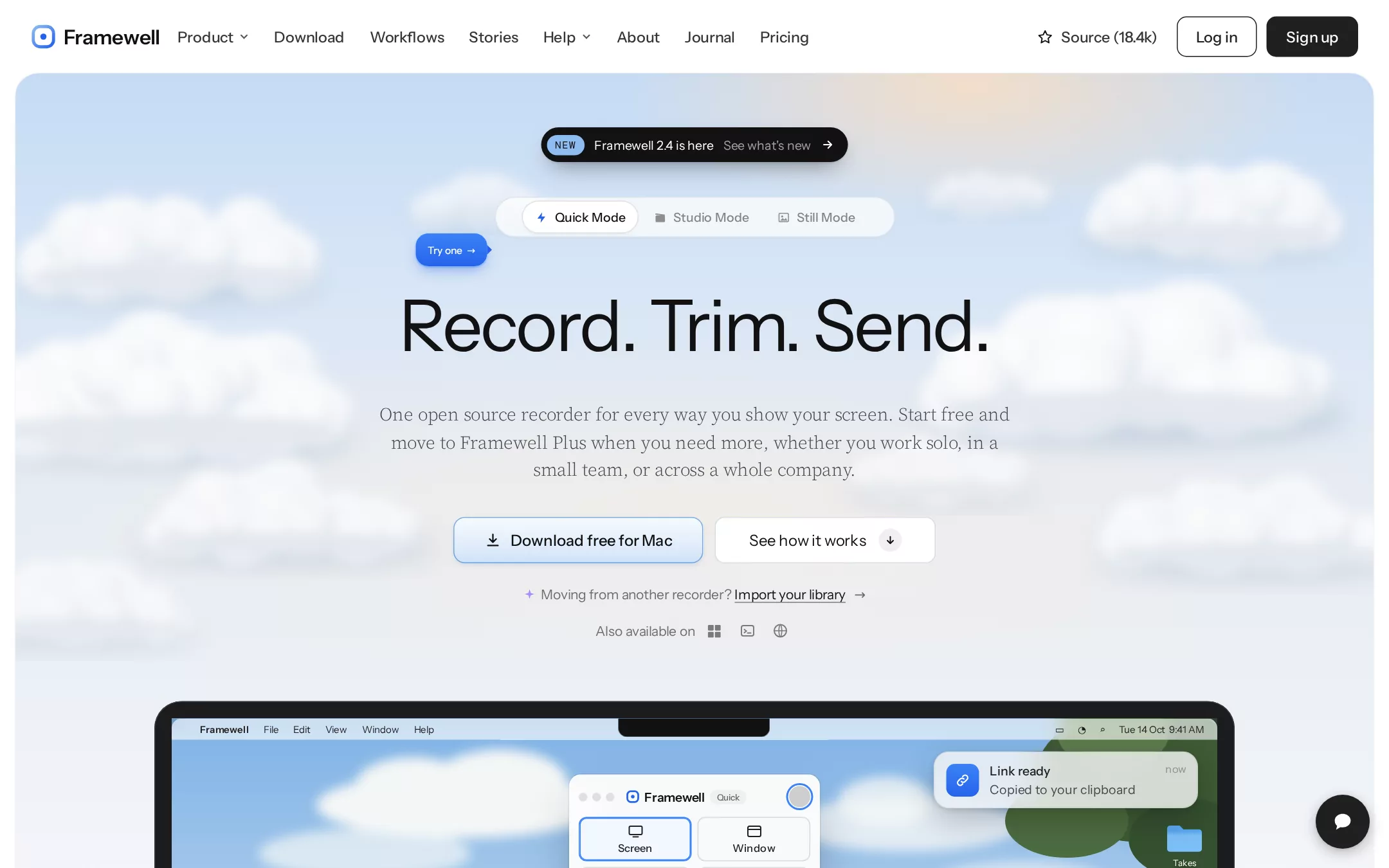
An original Framewell screen-recorder page on a white canvas with a fine film grain. A 76px header carries a rounded-square ring mark and the 21px Framewell wordmark at x 32, eight 15.5px weight 500 links from x 172 (Product and Help with chevrons), and at the right a star with Source (18.4k), a 1px #202020 outlined Log in and a #202020 Sign up, both 42px tall with 10px radii. Below it a 1408px #F8FAFC frame inset 16px with 24px top corners holds the hero: a 608px painted sky (#C8DDF6 to #EDF1F6 with a peach sun glow at the top right) full of soft seeded-SVG cumulus clouds; a black 36px announcement pill with a pale-blue NEW chip at y 132; a translucent 42px pill switcher of three modes at y 204 with a small blue Try one callout; the centred 74px headline Record. Trim. Send. at y 302; a three-line 19px light serif lead at y 415; a 259×48px pale-blue gradient Download button beside a 229×48px white See how it works button at y 536; an import line and an Also available on row of three generic platform glyphs; and from y 727 a dark laptop whose screen shows a painted bay wallpaper, a menu bar, the floating Framewell recorder panel and a Link ready toast. A dark 56px help bubble sits fixed at the bottom right. Below the fold: a three-mode explainer in a grey tray, a Quick Mode split, a Studio Mode split, a testimonial wall, a pricing teaser, a download card and a footer.
- Best forScreen recorders, async video messaging, screenshot tools, demo and walkthrough apps, and open-source desktop utilities that want a friendly, sky-lit hero and a real product shot above the fold.
- Tech stack- Next.js (App Router) - React - TypeScript - CSS custom properties Use Next.js App Router, React and TypeScript with plain CSS custom properties for every colour, radius, shadow and spacing token. Render the page as server components; only the mode switcher (which swaps the laptop's recorder panel), the accordions and the mobile menu need small client islands holding state in memory. Self-host Instrument Sans (variable), Source Serif 4 (variable, with the optical-size axis) and DM Mono, all SIL Open Font License, as woff2 files through next/font/local — no remote font request. Draw the ring mark, every icon, the clouds, the wallpaper, the laptop and the recorder UI as inline SVG and HTML; generate the clouds from a fixed seeded list committed to the repo so the markup is identical on every render. Provide page metadata. Build and run the production page before capturing its preview.
The prompt. 1809 words, self-contained.
Build the "Cap" kickstart — A bright, open-source screen-recorder homepage: a 74px regular-weight sans headline under a painted cumulus sky, a light serif lead, a pale-blue download button beside a white one, a pill mode switcher, and a laptop showing the recorder panel and a link-ready toast.

## Design
Build a rebrandable landing page for an open-source screen and camera recorder: a desktop app that records your screen in three ways — a quick shareable link, a full-quality studio take with an editor, and a polished screenshot.

Create a complete landing page for Framewell, a fictional open-source screen recorder. This is a concept presentation, not a real company — no real product, customer, person or logo. Use original branding, artwork and copy throughout.

Color: a white page with one pale frame laid on it, and a painted sky inside the frame. Page #FFFFFF with a 0.18-opacity film grain. Frame #F8FAFC is the 1408px hero frame and every section below it. Paper #FCFCFC is every card, panel and button label on dark. Ink #111111 is every headline and button label on light; Charcoal #202020 fills the dark buttons and borders the outlined one; Nav #353535 is the header links; Lead #3F4247 is the serif lead; Slate #646464 is captions and secondary text; Hint #6B6E73 is the import line; Graphite #838383 is inactive icons. Fog #E0E0E0 is every card border; Ash #E5E7EB is the lowest dividers; Mist #F0F0F0 is the grey tray, hover fills and the small arrow circles. Sky: a linear gradient #C8DDF6 0%, #D9E7F8 34%, #E6EDF6 66%, #EDF1F6 100%, with a radial peach glow rgba(255,224,192,0.8) at 70% 2% and a cream glow rgba(255,240,224,0.5) at 50% 74%. Action Blue #2563EB is the only saturated colour: the active mode icon, the callout, on-state toggles and focus rings; text on it is #FFFFFF. The NEW chip is #8DBCF0. Never use blue for large surfaces or decoration.

Typography: headings use "Instrument Sans", "Inter", ui-sans-serif, system-ui, -apple-system, "Segoe UI", sans-serif and body uses the same stack; the lead uses "Source Serif 4", "Source Serif Pro", Georgia, serif; chips use "DM Mono", ui-monospace, "SF Mono", Menlo, monospace. Hero headline 74px/72.52px weight 400, letter-spacing -2.22px. Section headings 56px/56px weight 400, letter-spacing -1.68px; split-section headings 50px/50px, -1.5px; card titles 22px/24.2px, -0.44px. Lead 19px/28.5px serif weight 300, letter-spacing -0.19px. Navigation 15.5px weight 500; buttons 16px weight 500; pills 13px; eyebrows 11px weight 500 uppercase with 0.2em tracking.

Layout: a 1440px canvas. Coordinates below are page coordinates. Content width 1200px below the hero. Spacing on a 4px base; 160px between sections. Radii: 24px frame top corners, 12px cards and the download button, 10px header buttons and the secondary button, 16px the download card and toast, 9999px pills.

Navigation: a 76px white header. At x 32 a 26px rounded-square ring mark (a 3.2px stroke from #8DBCF0 to #2563EB around a small #2563EB dot) and the 21px weight 600 wordmark Framewell. From x 172: Product (chevron), Download, Workflows, Stories, Help (chevron), About, Journal, Pricing. At the right, ending 32px from the edge: a star icon with Source (18.4k), the outlined Log in button and the dark Sign up button.

Hero (id top): the #F8FAFC frame starts at y 76, inset 16px, with the painted sky in its top 608px fading into the frame colour. Soft cumulus clouds fill the sky's left and right thirds and thin out behind the text: each cloud is a cluster of overlapping circles with a white-to-#DEE6F0 radial fill, blurred about 5px, over a flat pale base and a blurred #AFBFD3 shadow — generated from a fixed seeded list. Centred at y 132 the announcement pill: NEW chip, Framewell 2.4 is here, See what's new and an arrow. At y 204 the 415px mode switcher: Quick Mode (active, blue bolt), Studio Mode (clapperboard), Still Mode (image). A blue Try one callout points at it from x 431, y 242. At y 302 the one-line headline Record. Trim. Send. At y 415 a 660px three-line lead: One open source recorder for every way you show your screen. Start free and move to Framewell Plus when you need more, whether you work solo, in a small team, or across a whole company. At y 536 the button pair, centred with a 12px gap: Download free for Mac and See how it works. At y 604 a 14px line: a small violet sparkle, Moving from another recorder?, an underlined Import your library and an arrow. At y 640 Also available on with three 28px generic glyphs — a four-pane window, a terminal prompt and a globe.

Product shot (id product): from y 727 a 1120px dark laptop (#1C1C1E bezel, 28px top radius, 18px bezel) centred, running past the fold. Its screen shows a painted wallpaper — a blue sky with soft clouds, hazy hills, a blue bay with sparkle strokes and a dark tree at the right — a translucent 22px menu bar (Framewell, File, Edit, View, Window, Help, status icons, Tue 14 Oct 9:41 AM), a black notch, a Takes folder icon, the 260px recorder panel (window dots, mark, Framewell, a Quick tag and a ringed record dot; Screen, Window, Region and Camera only options with Screen selected; rows No camera, Studio microphone with its toggle on, Record system audio) and, at its top right, the toast Link ready / Copied to your clipboard / now. A 56px #202020 help bubble with a white speech glyph is fixed 20px from the right edge at y 824.

Three modes (id modes): a #2563EB-dotted eyebrow 3 MODES, the 56px heading One recorder for every workflow, a two-line 17px serif lead and a small Download Framewell button; then a #F0F0F0 tray with 12px radius and 16px padding holding three mode cards — Quick Mode (Record, stop, and the link is already on your clipboard), Studio Mode (Full quality, edited before anyone sees it) and Still Mode (Screenshots that look designed) — each with a 22px title, three numbered steps and a Best for line.

Quick Mode (id quick): a split section — at the left an eyebrow QUICK MODE, the 50px heading Share your screen or camera instantly, a serif lead and an accordion of three rows (Uploads while you record, The link is on your clipboard, Share publicly or privately) with hairline dividers; at the right a 16px-radius panel with a pale blue-to-lilac gradient holding a flat HTML viewer page; below, a two-by-three grid of small features (Instant links, Background upload, Auto captions, Summaries, Chapters, In-browser viewing).

Studio Mode (id studio): the mirror split — the gradient panel at the left with an HTML timeline editor, and at the right the eyebrow STUDIO MODE, the 50px heading Record in full quality, edit before you send and the accordion Records locally in full quality, An editor built in, Export anywhere.

Testimonials (id stories): a centred 56px heading Teams that stopped scheduling meetings and three columns of #FCFCFC quote cards with 1px #E0E0E0 borders, each with a 15px quote, a 32px initial avatar and an invented name and team.

Pricing (id pricing): two cards side by side — Free (Quick Mode, unlimited local recordings) and Framewell Plus (custom domain, longer links, team spaces) — with the dark button on Free and the pale-blue button on Plus.

Download (id download): a #FCFCFC card with 16px radius, 1px #E0E0E0 border and a soft 0 20px 25px -5px rgba(0,0,0,0.05) lift: the mark, the 50px line Start recording in a minute., the button pair and the Also available on row.

Footer: on #F8FAFC, the mark and wordmark, four 14px #646464 link columns (Product, Resources, Compare, Company) and the line © Framewell sample · a fictional open-source recorder. Not a real company.

## Tech stack
- Next.js (App Router)
- React
- TypeScript
- CSS custom properties

Use Next.js App Router, React and TypeScript with plain CSS custom properties for every colour, radius, shadow and spacing token. Render the page as server components; only the mode switcher (which swaps the laptop's recorder panel), the accordions and the mobile menu need small client islands holding state in memory. Self-host Instrument Sans (variable), Source Serif 4 (variable, with the optical-size axis) and DM Mono, all SIL Open Font License, as woff2 files through next/font/local — no remote font request. Draw the ring mark, every icon, the clouds, the wallpaper, the laptop and the recorder UI as inline SVG and HTML; generate the clouds from a fixed seeded list committed to the repo so the markup is identical on every render. Provide page metadata. Build and run the production page before capturing its preview.
Where the repo you are working in already has an equivalent in place, keep the repo's choice and say which one you kept.

## Everything else
Keep Framewell clearly fictional and rebrandable: no real company, product, customer, statistic or person, and no operating-system or browser logos — the platform row uses generic glyphs. The headline is never bold. Shadows appear only on the announcement pill, the active mode segment, the callout, the recorder panel, the toast, the help bubble and the download card; everything else separates by 1px hairlines. Text pairs clear WCAG AA: #111111, #353535, #3F4247, #646464 and #6B6E73 on #FFFFFF, #F8FAFC and the sky, #FCFCFC on #202020 and #111111, and #FFFFFF on #2563EB. Every link leads to a real section on the page; the download buttons scroll to the Download section and the sign-up form validates locally and sends nothing. The page loads no analytics or tracking script and shows no cookie banner. Content is initially visible: no typing effects, counters, parallax, marquees or scroll reveal; hovers take 150ms and every transition stops for prefers-reduced-motion. Every control shows a 2px #2563EB focus ring with a 2px offset; the clouds and wallpaper are decorative and hidden from assistive technology; the mode switcher is a proper tablist. At 360px the frame insets 8px, the navigation collapses into a Menu button, the headline drops to 44px/46px, the lead to 17px, the buttons stack full width, the laptop scales to the frame width, split sections stack, the mode cards stack, and the page never overflows horizontally.

### Non-negotiables
- Responsive from 360px through desktop — no horizontal page overflow at any width. Deliberately scrollable regions stay within the viewport and remain keyboard and touch accessible.
- Every text/background pair clears WCAG AA (4.5:1 for body, 3:1 for large text); adjust a tint rather than shipping a failing pair.
- Fully keyboard operable, with a visible focus ring drawn in the accent colour.
- Honour `prefers-reduced-motion` — swap every transition for an instant state change.
- Write real copy in the voice described above; no lorem ipsum and no TODO placeholders.
- Use system or self-hosted fonts and CSS/SVG-drawn graphics — do not depend on a remote image or icon service.

Build the whole page end to end and show me the result running — not a description of it.